


Company Stores

Our company, redemption and fundraising stores make it easy to onboard and reward employees, thank clients through print on demand branded merchandise.
Learn more »Swag Boxes

We make it easy to build, store and distribute swag boxes and kits worldwide to delight new employees, thank clients, wow prospects and more.
Learn more »Factory Direct

Our direct manufacturer relationships and compliance expertise make it easy to create custom products or order larger quantites cost effectively from overseas.
Learn more »Eco Friendly

We specialize sustainable promotional products designed to reduce waste, promote reuse and encourage sustainable and eco-friendly business and manufacturing practices.
Learn more »Our Story

Our mission is to provide promotional products that help businesses grow their brand in a simple and socially conscious way.
Learn more »Give Back

We believe in giving back to not only the world, but the people in it, which is why we support brands that give back.
Learn more »Diversity

We pride ourselves on fostering a diverse and inclusive supply chain, strengthen diversity within industries and promoting equity across all sectors.
Learn more »Blog
Explore helpful articles from our promo experts—covering everything from eco-friendly ideas and product tips to industry news, tech insights, and success stories.
Learn more »
Vector vs. Raster Artwork
Vector Images
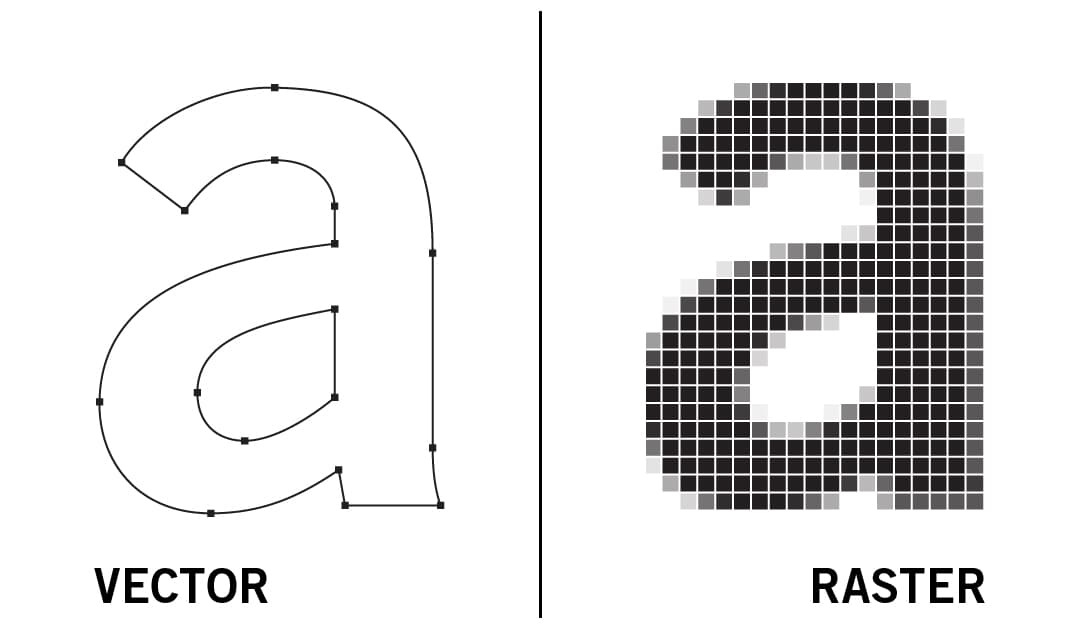
Vector-based images are made up of various “objects,” a term which essentially means lines and shapes. These objects are defined mathematically by a set of algorithms or formulas, which allow them to be redrawn over and over. This is not to say that using vector images requires any great mathematical skill, as the mathematics are handled almost entirely behind the scenes, by whatever software is using the image. Vector-based graphics are resolution independent, making them the industry standard for printing. If your artwork is vector it will be scalable to any size and print at optimal definition.
Logos usually need to be separated from the background, resized or otherwise manipulated. Vector images offer the most versatility for these purposes and therefore are preferred for printing on a large majority of Deluxe products.
Common Vector File Types
.ai is Adobe Illustrator – Default file type of Illustrator, a popular vector-based program.
.eps is Encapsulated Postscript – Vector file which can be opened outside of Illustrator.
.pdf is Portable Document Format – Self-contained document which preserves vector images as well as fonts or graphics needed to display correctly.
.cdr is CorelDRAW – Default file type of CorelDRAW, a popular graphics design program.
.svg is Scaleable Vector Graphics – XML-based vector image format supported by modern web browsers.
Deluxe prefers vector artwork in one of the following formats: .ai, .eps, .pdf, and .cdr
*A PDF is generally a vector file. However, depending on how a PDF is originally created, it can be either a vector or a raster file. Whether you opt to flatten the layers of your file or choose to retain each one will determine the image type.
Raster-Based Images
A raster graphic or image is made up of pixels. Pixels are small squares of information. In order to understand what a raster graphic is, imagine a large grid that is made up of many squares (pixels) of all the same size. If you put a different color in each square and then, you back away from the grid, the individual squares blend together to make up a picture. This is a raster graphic or bitmap graphic. Raster graphics are wonderful for rich, full-color images such as photographs. Raster graphics are rendered images on a pixel-by-pixel basis and they are fantastic when handling shading and gradients.
Suitable Raster Formats
Raster graphics are great when creating rich and detailed images. Every pixel in a raster image can be a different color, therefore, you can create a complex image with any kind of color changes and variations.
.jpg is Joint Photographic Experts Group – Sometimes displayed as .jpeg – this raster image format is best for displaying photographic images on web browsers.
.tiff is Tagged Image File Format – Sometimes displayed as .tif – Raster image format best for high-resolution photos.
.png is Portable Networks Graphics – Raster image format best for displaying simple images and supports transparency.
.psd is Photoshop Document – a layered image file used in Adobe PhotoShop. A proprietary file that allows the user to work with the images’ individual layers even after the file has been saved.
.gif is Graphics Interchange Format – Raster image format best for simple images made up of solid colors with no gradients.
.bmp is Bitmap Image File – a raster graphics image file format used to store bitmap digital images, independently of the display device.
Although word processors, spreadsheet programs and presentation applications (such as the Microsoft Office suite) may be suitable for creating files for office or Internet use, they are not recommended for creating digital art for print. In some cases, however, such files may be converted so as to enable use.
Why Image Resolution Matters
“Resolution” refers to the number of colored dots or pixels that make up an image. It is commonly expressed in dpi or dots per inch. The higher the dpi, the better the image/print quality. Images intended for full-color printing need to have a resolution of 300 dpi.
You’ll be notified if we encounter any possible printing issues should the submitted files not be up to standard printing requirements.


